Sunday, March 6, 2011

SSD vs HDD?

Haawww. So tired lah dis week. Been busy with Modul Pembangunan dan Kepimpinan Pelajar(LPPKP) at my uni and at the same time arrange/allocate time to upgradee my desktop :D The LPPKP is a mandatory program and all students need to attend if you want to know...

So, I decided to upgrade my PC and straight away I browse through Lowyat.net forum to find PC hardware that suits my limited budget. So, I end up bought the Gigabyte GA EP45-UD3R motherboard (and sell my EP41-UD3L ), adding another 2GB RAM, bought Zalman CPU cooler and adding another 500GB of space. CODed with other forumer at various places(very far from my hometown weh) including ampang, pj, puchong..T_T..The reason why I want to upgrade is because want to try overclock my E7400. The G41 chipset cannot overclock much; even +5 increase in FSB will make system restart and load default BIOS value.lousy..

My journey in rather small upgrade.

The box and contents inside

Zalman CNPS9500 LED CPU cooler


The board..beautiful indeed


The 'heart' of a computer on my old mobo


Installing retention bracket and the cooler


But..i feel kinda not complete.
My wishlist now is a new graphic card and most importantly a SSD..wuuhuu. That’s what I want to write in this entry actually (kinda long intro huh?..huhuh). So, what the heck is solid state disk(SSD) and why is it better than hard disk drive(HDD)? This kind of question once strike through my berain and after some googling(simple ya), I started to understand and put SSD into my wishlist.


SSD or Solid State Disk basically is a disk that has NO moving parts. It contains several memory chip on a board to store data.


Lets differentiate it shall we?

Price
SSD: Expensive
HDD: Cheap

How it works?
SSD: Use non-volatile flash memory
HDD: Magnetizing ferromagnetic material

Reliability
SSD: Can sustain 100K write cycles per cell
HDD: Has a lifespan

Speed
SSD: 170 MBps typically
Access time between 35-100 ms
HDD: 80 MBps typically
Access time between 5000-10000ms

Noise
SSD: Quiet because no mechanical parts
HDD: Clicks and crunching noise

Vibration
SSD: Can sustain up to 1500G’s
HDD: 350G’s to 800G’s only

Power consumption
SSD: Low
HDD: High

Heat Dissipation
SSD: Less heat produced
HDD: Has moving parts thus more heat

Cost
SSD: $3 per gigabyte
HDD: 20-30 cents per gigabyte

Below is demo video..

Tuesday, February 1, 2011

Heads Up: Samsung Galaxy 5 GT-I5500 Will Get Froyo Update

Great news for those who own Samsung Galaxy 5..such as me(hehe).


Samsung has released source code for Android 2.2(froyo) at HERE. So, we can expect it will be available for us to upgrade end of February of middle of March. ::wink2::


At last, after waiting for merely 2 months, froyo is coming. By the way, if you want to try unofficial Froyo for Galaxy 5, you can go to samfirmware. The firmware and instruction is there.

I did try the Froyo but, after 2 days, I revert back to 2.1(Eclair) because the unofficial Froyo have bug in it(a lots of it) such as compass heading is completely wrong(resulting arrow is gps apps will upside down), side key for volume not functioning during keylock(in eclair can..to lower music volume) or during phone call, battery cant hold longer and etc2.

So, if you still want to try the Froyo(or can't wait anymore), go to samfirmware site I mentioned before. Bear in mind though that, flashing the phone ROM is dangerous and may(hopefully not) bricked your device. Proceed with caution. :)

Saturday, January 29, 2011

Build Your Own Android Application

Halu halu halu!!

Pekabar pembaca2 sekalian? Sihat tak korang rini? Harap2 sihat la sentiasa..aku ok je cambese..assignment mula dah nak berlambak dan berbungkus. Petang tadi ada karnival sukan kat uni. Meriah la jugak even hujan lebat sekejap tadi. Actually, frust jugak la tak dapat provide gambar2 menarik sebab aku tak bawak camera gi event tu tadi. :(

So..untuk entry kali ni aku nak menghebahkan la pasal Appinventor dari Google. Appinventor ni adalah seperti berikut:

"application provided by that allows anyone
to create software applications for the Android OS"

See? Feature yang agak menarik disediakan oleh Google. Android OS adalah operating system dari Google berdasarkan Linux. Cara tradisional programmer nak buat software biasanya dorang wat pakai coding bagai.

Tapi dengan Google App Inventor korang boleh buat software korang sendiri secara drag n drop gitu. Aku dah cuba dah buat 2 tutorial and my conclusion is this is supposed the way to create application..so easy..seriusly. Mula2 buat interface then setting aturcara program korang. Thats it!

Ni antara screen cap App Inventor:


-buat interface dulu-


-then wat aturcara dalam block editor-

Jadi, kepada sapa2 yang ada Android phone ni try la. Kelebihannya adalah korang boleh connect phone terus ke PC. Masa korang edit2 tu nanti korang akan nampak application tu running real-time kat phone korang. Serius cool. Takyah compile lagi dah boleh tengok running application. Pastu, kalau2 korang dapat buat application gempak2 manala taw le letak dalam app market. Leh jual dan dapat untung..ngee~~

So, apa tunggu lagi. Jom explore App Inventor

Thursday, January 20, 2011

How Do I Do It: Make Bootable USB Flash Drive

So, you already got Windows installation disc or setup but you're using netbook which is CD/DVD drive is not available. I'm sure you'll wondering how to setup a fresh installation of Windows into you netbook especially when you also doesn't have external CD/DVD drive.

This kind of situation also happened to me before when I want to install WinXP into my netbook. However, I sure you got yourself a pendrive/flash drive(whichever you wanna call it). You can make your pendrive bootable(able to boot from pendrive rather than hard drive). Here's how I do it.

Requirements:
-windows installation files
-pendrive(4GB recommended)
-netbook/pc that support boot from usb flash drive

Steps:
1. Download WinToFlash here.
2. Extract it and run the .exe file.
3. Upon running, you'll see windows like this
4. You can follow the wizard to guide you or you also can select "Advanced Mode" to continue but, for sake of simpleness, I will use wizard mode.
5. Press the big-green-write-mark and you'll come to this section. Selecting source and target. Point to windows installation folder or drive(Windows files path). After that, point to your USB drive.
5. Click next and it will make everything for you. From format, install loader, copy files..everything ;)
6. After that, continue try to boot from flash drive. Remember to select boot from USB Flash Drive. Press F9 during POST.

P/s: Need to remember this though, formatting/installing from USB Flash Drive is hell lot slower than using CD/DVD. So, if you got budget or if you a technician, please do yourself a favor, buy external USB DVD Drive :)


Wednesday, January 5, 2011

Happy New Year

Ohmai!! Lama gile aku tak menaip dalam blog nih. Dekat sebulan dah. Bukan apa, masa cuti semester tu asyik sibuk dengan kerja dan tak terpiak pun nak tulis belog. Aiyoyoo amma?!

Sooo, how's your day? For me, ok la. Dapat kerja temporary kat Asia Assistance, PJ sementara tunggu cuti habis. Sumpah teruk jugaklah kerjanya tapi *petik jari* senang je la kerjanya. Kat sana aku work as scanner and data entry. Salary pun boleh tahan. Sila simpan niat anda nak minta saya belanja oke..tidak dpt..:p haha.


2010 has left us. Eh, ke kita yang tinggalkan tahun 2010?*konpius*. Anyway, Happy New Year to y'all my beloved readers(eh ada ke?=.="..ke aku syok sendiri..ah lantaklah). What's your new year resolution? For me, mestilah nak good-good je. To make 2011 better than 2010 in term of...everything la..haha..edu, economic etc2..on god will:)


Sooo, awal tahun ni(3hb) mula semester 4 study aku dalam netcentric computing. Kali ni dah tak buley relax dah. Subjek pun dah banyak. Hopefully boleh dapat pointer lagi tinggi dari sebelum ni. Amin.

K lah..tu je nak tulis. Ada lagi benda nak tulis tapi takde mood lagi. Will update more soon. :)

Kthxbye..

p/s: jalan2 terjumpa inspira..2 kali tu..so syok liao..!

Thursday, December 9, 2010

1st day at work

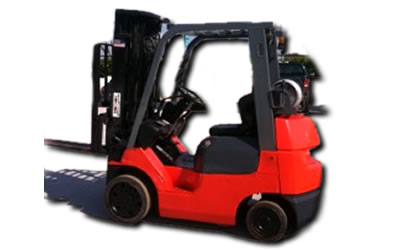
Hari ni aku mula start kerja part-time kat gudang Clipsal.
Serius penat tapi seronok la wat stock checking. Staff2 kat situ memang peramah ngan kelakar gila la.
Tapi yang paling seronok dapat bawak forklift..ngeee~~


Wednesday, December 8, 2010

Kuala Lumpur International Motor Show - KLIMS

International Motor show kembali lagi dengan kali ini diadakan pula di tengah-tengah Kuala Lumpur.
Bertempat di Putra World Trade Center(PWTC), korang semua boleh datang mulai sekarang hingga 12hb Dec 2010. Visiting hours pula adalah:
Weekdays: 11.00am - 10.00pm
Weekends / Public Holidays: 10.00am - 10.00pm

Aku dah pergi so, bolehlah tunjuk-tunjuk sikit gambar yang lousy ni. Enjoice....

panaskan badan dulu..menapak menyeberangi sungai klang


masuk2 je tengok kereta concept dari perodua - BEZZA


boleh customize proton anda sendiri serta cuba simulator kat situ

ni lah dia Proton EMAS

engine bay Satria Neo R3 berupaya mengeluarkan 200 carbon monoxide


chev Camaro a.k.a Bumblebee

kereta2 pelik dari pertandingan rekacipta

ingat kereta je ade?..motor pun ada la

audi R8 with matte finish..smart(dari exoticmods)

pun dari exoticmods..Golf GTi MK6

aku pun taktau la ape ni

lamborghini LP670

Ferrari 458

maserati quattroporte

Ha..tu lah sedikit sebanyak gambar KLIMS..hehe..

Oh, harga tiket:
Category Weekdays (per entry) Weekends & Public Holiday (per entry)
Adults RM15.00 RM20.00
Child (aged 12 yrs & below) RM5.00 RM5.00
(FREE for children aged 5 & below)
Family Package
RM30.00 per family RM40 per family
(Husband & Wife with max 5 children aged 12 yrs & below)
Student RM5.00
(with student ID card / school uniform)
RM20.00
Handicapped Complimentary Entry
(with handicapped card / physically handicapped)
FREE for accompanying person, 1 ticket only


3152E8B06184DCAA296BA720E4BD41CB

noty2: inb4 Inspira > everything