Xiaomi Mi 3 from Xiaomi Malaysia.
Excited. XD
Wait for it.....
Tuesday, September 9, 2014

Saturday, July 19, 2014
NEC/RENESAS PCIe USB 3.0 Host Controller Driver
Let me guess. Most probably you are here is because you are searching driver for below Device IDs
PCI\VEN_1912&DEV_0014&SUBSYS_00000000&REV_03
You might bought the device in eBay and the driver included is not working. Well, fear not, I might have solution for you.
Head to this LINK and download the package. Extract it and run the .exe.
*fingers crossed. Don't forget to leave some comment if this works for you :)
Cheers.
PCI\VEN_1912&DEV_0014&SUBSYS_00000000&REV_03
You might bought the device in eBay and the driver included is not working. Well, fear not, I might have solution for you.
Head to this LINK and download the package. Extract it and run the .exe.
*fingers crossed. Don't forget to leave some comment if this works for you :)
Cheers.
Thursday, May 29, 2014
How To Verify Samsung Phone Warranty Through SMS in Malaysia
Type new SMS message:
PC [imei #]Send to:
- 62002 for Celcom user
- 33802 for other telco user.
Wednesday, February 26, 2014
Windows Not Automatically Mount Your USB Stick/Ext HDD?
In case you are wondering why all of the sudden your OS doesn't automatically mount your flash drive and you had to manually assign drive letter, this may caused by your auto mount is disabled. Usually, people who recently installed disk/partition management software will encounter this problem.
To rectify this, simple re-enable the automount.
1. Launch command prompt: CTRL+R > type 'cmd' > enter
2. Run diskpart utility: type 'diskpart' > enter
3. Enable auto mount: type 'automount enable'
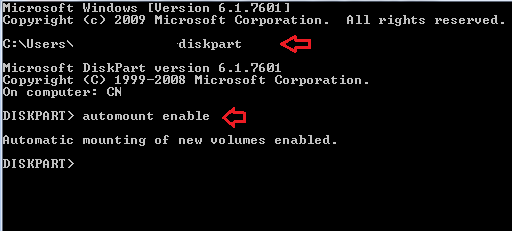
Hope this helps :)
To rectify this, simple re-enable the automount.
1. Launch command prompt: CTRL+R > type 'cmd' > enter
2. Run diskpart utility: type 'diskpart' > enter
3. Enable auto mount: type 'automount enable'
Hope this helps :)
Wednesday, January 29, 2014
How To Enable Windows Installer Service In Safe Mode
When things go wrong with your Windows especially after new software or driver installation/upgrade, among first thing you can do is to uninstall the program that causes the problem. But what if the new program somehow make you unable to boot into normal Windows state? Yeah you can boot into safe mode and uninstall but the things is, by default Windows Installer service are not running during safe mode. This service is required to perform installation, maintenance and removal of software in Windows.
There's a simple way to enable the service though by editing the registry entry. All we have to do is to add new REG_SZ key with the service name 'MSIServer' and the value data 'Service'.
To make it simpler for you, you can just download this file onto your desktop and run it. It will automatically register the entry into your computer registry.
Hope this helps you in some way:)
There's a simple way to enable the service though by editing the registry entry. All we have to do is to add new REG_SZ key with the service name 'MSIServer' and the value data 'Service'.
To make it simpler for you, you can just download this file onto your desktop and run it. It will automatically register the entry into your computer registry.
Hope this helps you in some way:)
Tuesday, November 26, 2013
How To Toggle Fullscreen with Remote Desktop Connection in Windows
For most IT related staff, I'm sure you guys use remote desktop or mstsc quite frequently. For me, one of the most common problem with it is the fullscreen bug. When you are doing your remote in fullscreen and you minimize or downsize the window, it will most likely to not revert to fullscreen windows when you maximize the window. At the beginning, I will simply close the window and relaunch remote desktop with fullscreen mode.

But, there is a way to toggle to fullscreen..quite simple actually. The keystrokes is Ctrl+Alt+Break.
For HP Pavilion dv4 users like me, the keystrokes is Ctrl+Fn+Alt+Right Shift key.
Thats it. Hopefully this will help somebody and if you have different key combination for different PC, do share in comment section.
Adios!

But, there is a way to toggle to fullscreen..quite simple actually. The keystrokes is Ctrl+Alt+Break.
For HP Pavilion dv4 users like me, the keystrokes is Ctrl+Fn+Alt+Right Shift key.
Thats it. Hopefully this will help somebody and if you have different key combination for different PC, do share in comment section.
Adios!
Wednesday, July 17, 2013
Sample of Insurance Policy Cancellation Letter
Just want to share the sample of insurance cancellation letter I once use to cancel mine.

Download from here and edit the doc with your details.

Download from here and edit the doc with your details.
Subscribe to:
Posts (Atom)