Tuesday, February 1, 2011

Heads Up: Samsung Galaxy 5 GT-I5500 Will Get Froyo Update

Great news for those who own Samsung Galaxy 5..such as me(hehe).


Samsung has released source code for Android 2.2(froyo) at HERE. So, we can expect it will be available for us to upgrade end of February of middle of March. ::wink2::


At last, after waiting for merely 2 months, froyo is coming. By the way, if you want to try unofficial Froyo for Galaxy 5, you can go to samfirmware. The firmware and instruction is there.

I did try the Froyo but, after 2 days, I revert back to 2.1(Eclair) because the unofficial Froyo have bug in it(a lots of it) such as compass heading is completely wrong(resulting arrow is gps apps will upside down), side key for volume not functioning during keylock(in eclair can..to lower music volume) or during phone call, battery cant hold longer and etc2.

So, if you still want to try the Froyo(or can't wait anymore), go to samfirmware site I mentioned before. Bear in mind though that, flashing the phone ROM is dangerous and may(hopefully not) bricked your device. Proceed with caution. :)

Saturday, January 29, 2011

Build Your Own Android Application

Halu halu halu!!

Pekabar pembaca2 sekalian? Sihat tak korang rini? Harap2 sihat la sentiasa..aku ok je cambese..assignment mula dah nak berlambak dan berbungkus. Petang tadi ada karnival sukan kat uni. Meriah la jugak even hujan lebat sekejap tadi. Actually, frust jugak la tak dapat provide gambar2 menarik sebab aku tak bawak camera gi event tu tadi. :(

So..untuk entry kali ni aku nak menghebahkan la pasal Appinventor dari Google. Appinventor ni adalah seperti berikut:

"application provided by that allows anyone
to create software applications for the Android OS"

See? Feature yang agak menarik disediakan oleh Google. Android OS adalah operating system dari Google berdasarkan Linux. Cara tradisional programmer nak buat software biasanya dorang wat pakai coding bagai.

Tapi dengan Google App Inventor korang boleh buat software korang sendiri secara drag n drop gitu. Aku dah cuba dah buat 2 tutorial and my conclusion is this is supposed the way to create application..so easy..seriusly. Mula2 buat interface then setting aturcara program korang. Thats it!

Ni antara screen cap App Inventor:


-buat interface dulu-


-then wat aturcara dalam block editor-

Jadi, kepada sapa2 yang ada Android phone ni try la. Kelebihannya adalah korang boleh connect phone terus ke PC. Masa korang edit2 tu nanti korang akan nampak application tu running real-time kat phone korang. Serius cool. Takyah compile lagi dah boleh tengok running application. Pastu, kalau2 korang dapat buat application gempak2 manala taw le letak dalam app market. Leh jual dan dapat untung..ngee~~

So, apa tunggu lagi. Jom explore App Inventor

Thursday, January 20, 2011

How Do I Do It: Make Bootable USB Flash Drive

So, you already got Windows installation disc or setup but you're using netbook which is CD/DVD drive is not available. I'm sure you'll wondering how to setup a fresh installation of Windows into you netbook especially when you also doesn't have external CD/DVD drive.

This kind of situation also happened to me before when I want to install WinXP into my netbook. However, I sure you got yourself a pendrive/flash drive(whichever you wanna call it). You can make your pendrive bootable(able to boot from pendrive rather than hard drive). Here's how I do it.

Requirements:
-windows installation files
-pendrive(4GB recommended)
-netbook/pc that support boot from usb flash drive

Steps:
1. Download WinToFlash here.
2. Extract it and run the .exe file.
3. Upon running, you'll see windows like this
4. You can follow the wizard to guide you or you also can select "Advanced Mode" to continue but, for sake of simpleness, I will use wizard mode.
5. Press the big-green-write-mark and you'll come to this section. Selecting source and target. Point to windows installation folder or drive(Windows files path). After that, point to your USB drive.
5. Click next and it will make everything for you. From format, install loader, copy files..everything ;)
6. After that, continue try to boot from flash drive. Remember to select boot from USB Flash Drive. Press F9 during POST.

P/s: Need to remember this though, formatting/installing from USB Flash Drive is hell lot slower than using CD/DVD. So, if you got budget or if you a technician, please do yourself a favor, buy external USB DVD Drive :)


Wednesday, January 5, 2011

Happy New Year

Ohmai!! Lama gile aku tak menaip dalam blog nih. Dekat sebulan dah. Bukan apa, masa cuti semester tu asyik sibuk dengan kerja dan tak terpiak pun nak tulis belog. Aiyoyoo amma?!

Sooo, how's your day? For me, ok la. Dapat kerja temporary kat Asia Assistance, PJ sementara tunggu cuti habis. Sumpah teruk jugaklah kerjanya tapi *petik jari* senang je la kerjanya. Kat sana aku work as scanner and data entry. Salary pun boleh tahan. Sila simpan niat anda nak minta saya belanja oke..tidak dpt..:p haha.


2010 has left us. Eh, ke kita yang tinggalkan tahun 2010?*konpius*. Anyway, Happy New Year to y'all my beloved readers(eh ada ke?=.="..ke aku syok sendiri..ah lantaklah). What's your new year resolution? For me, mestilah nak good-good je. To make 2011 better than 2010 in term of...everything la..haha..edu, economic etc2..on god will:)


Sooo, awal tahun ni(3hb) mula semester 4 study aku dalam netcentric computing. Kali ni dah tak buley relax dah. Subjek pun dah banyak. Hopefully boleh dapat pointer lagi tinggi dari sebelum ni. Amin.

K lah..tu je nak tulis. Ada lagi benda nak tulis tapi takde mood lagi. Will update more soon. :)

Kthxbye..

p/s: jalan2 terjumpa inspira..2 kali tu..so syok liao..!

Thursday, December 9, 2010

1st day at work

Hari ni aku mula start kerja part-time kat gudang Clipsal.
Serius penat tapi seronok la wat stock checking. Staff2 kat situ memang peramah ngan kelakar gila la.
Tapi yang paling seronok dapat bawak forklift..ngeee~~


Wednesday, December 8, 2010

Kuala Lumpur International Motor Show - KLIMS

International Motor show kembali lagi dengan kali ini diadakan pula di tengah-tengah Kuala Lumpur.
Bertempat di Putra World Trade Center(PWTC), korang semua boleh datang mulai sekarang hingga 12hb Dec 2010. Visiting hours pula adalah:
Weekdays: 11.00am - 10.00pm
Weekends / Public Holidays: 10.00am - 10.00pm

Aku dah pergi so, bolehlah tunjuk-tunjuk sikit gambar yang lousy ni. Enjoice....

panaskan badan dulu..menapak menyeberangi sungai klang


masuk2 je tengok kereta concept dari perodua - BEZZA


boleh customize proton anda sendiri serta cuba simulator kat situ

ni lah dia Proton EMAS

engine bay Satria Neo R3 berupaya mengeluarkan 200 carbon monoxide


chev Camaro a.k.a Bumblebee

kereta2 pelik dari pertandingan rekacipta

ingat kereta je ade?..motor pun ada la

audi R8 with matte finish..smart(dari exoticmods)

pun dari exoticmods..Golf GTi MK6

aku pun taktau la ape ni

lamborghini LP670

Ferrari 458

maserati quattroporte

Ha..tu lah sedikit sebanyak gambar KLIMS..hehe..

Oh, harga tiket:
Category Weekdays (per entry) Weekends & Public Holiday (per entry)
Adults RM15.00 RM20.00
Child (aged 12 yrs & below) RM5.00 RM5.00
(FREE for children aged 5 & below)
Family Package
RM30.00 per family RM40 per family
(Husband & Wife with max 5 children aged 12 yrs & below)
Student RM5.00
(with student ID card / school uniform)
RM20.00
Handicapped Complimentary Entry
(with handicapped card / physically handicapped)
FREE for accompanying person, 1 ticket only


3152E8B06184DCAA296BA720E4BD41CB

noty2: inb4 Inspira > everything

Friday, November 26, 2010

Configuring Virtual Server

One of my beloved blog reader ask me to show how to setup virtual server(sorry I'm late becoz no time to open blog ). The reason to setup virtual server is to:

  • allow incoming request(http, ftp etc2) from outside to enter server located inside
  • to allow specific request to reroute to appropriate server(in case 1 server host many services)
I will demonstrate how I did it using my Aztech DSL1000EW becoz my Aztech WL830RT4 is currently not in use.
Things we need is:
  • Server itself. I'll use XAMPP as my webserver(apache) and inside, there's a index.html file which is target file I want to access.

  • Proper connectivity to internet, obviously and router that has virtual server feature
  • Your external IP address. To know your ext IP, visit HERE from your server
  • Internal IP or IP address of the computer that will act as server

Procedures:

1. Install XAMPP, run Apache and make sure it works by visit localhost or 127.0.0.1(depends on your configuration though).

2. Ok. If that went fine, proceed to step 2-configure virtual server. As I mention earlier, I'll use DSL1000EW so the GUI will be a lil bit different but I guess the term/jargon will not so different between manufacturer and model ;)
  • Access your gateway. For me it's 192.168.1.1. Enter username and password to continue login

  • Search for virtual server funtion and press 'ADD'

  • Select appropriate service(ftp, http, dns etc2). Whenever you select one service, router will automatically put port and protocol for you. So, for HTTP which uses port 80, router will enter 80 for external and internal port by default and TCP for the protocol. If you made any changes in webserver configuration(like port), feel free to edit the field or if you cannot find specific application, just enter it yourself the port.
  • In the server IP address field, enter the internal IP address(IP address of the webserver) in my case, I'll use 192.168.1.2

  • Click Apply/Save and you're done.
What we've done here is to command router to forward any HTTP packet it receives from outside to specified IP address that host the webserver. That's it.
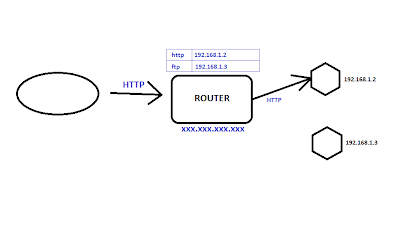


Now, try access from another PC that using other external IP address. In my case, I'll access from same PC so I'm gonna use proxy website. Enter your server external IP address not internal IP address-this is where lot people do the mistake.


press enter, then...
...And..Voila!..It works!

Now, I've several tips to improve this virtual server thingy.
1. Using Dynamic DNS(DDNS). If you are using internet package with dynamic IP(like PPPOE), please consider to subscribe with DDNS provider like DYNDNS. For more provider and how to configure is outside of this post scope. Please visit: HERE

2. Again, use DDNS to make it easier for visitors to visit your site. To remember number like IP is difficult so by using DDNS, you can have your own FQDN like server1.dyndns.org

3. If the server is getting IP from DHCP, consider to manually specify IP. This is because, DHCP may(and may not) change IP of the server.

Alrite. Should you guys have any question, feel free to comment. I'll try my best to help you out.:)

noty2: Aztech WL830RT4 is for sale..huhu..wireless got prob where max distance oni 8meters :(

3152E8B06184DCAA296BA720E4BD41CB